Understand how Perpetual Inventory (Real-Time Inventory Valuation) works with Odoo 19+
🔹 What it means
Perpetual inventory works on real-time valuation basis linked directly to vendor bills and customer invoices. Inventory is recorded as an asset on the Balance Sheet when the vendor bill is validated, and it remains there until the goods are sold. Upon customer invoicing, the system automatically transfers the cost from Inventory to COGS, recognizing both revenue and cost simultaneously in the Profit & Loss statement. This ensures accurate, real-time gross margin visibility without the need for period-end adjustments.
🔹 How it works in Odoo 19 and Later Versions
When a product is set to:
Inventory Valuation: Perpetual
Costing Method: FIFO / AVCO / Standard
Odoo automatically posts:
✦Vendor Receipt → Stock Variation Account (Visible under Inventory Valuation Reporting)
✦Customer Delivery → Stock Valuation Account (Visible under Inventory Valuation
Reporting)
✦Invoice → Customer / Vendor → Accounting entries created instantly
Example:
Receive goods worth $10,000
✦ Debit Stock Valuation (Inventory Valuation)
✦ Credit Accounts Payable
Sell goods costing $6,000
✦ Debit COGS/Expense
✦ Credit Stock Valuation (Inventory Valuation)
🔹 Best suited for
✦ Medium & Large businesses
✦ Companies requiring accurate real-time financials
✦ Audited organisations
✦ Manufacturing & trading companies
✦ ERP-driven operations
🔹 Typical business types
✦ Manufacturing companies
✦ Distributors
✦ Retail chains
✦ E-commerce
✦ FMCG
✦ Companies using FIFO / AVCO

Let us understand:
BASIC CONFIGURATION PERPETUAL INVENTORY
1. BASIC CONFIGURATION – PERPETUAL INVENTORY

2. Product Category Configuration
Create a Product Category with the following settings:
✦ Inventory Valuation: Automated (Perpetual)
✦ Costing Method: FIFO / AVCO / Standard
✦ Stock Valuation Account: Inventory Valuation
✦ Stock Variation Account: Stock Variation
✦✦ Stock Variation
In Odoo 19 and Later Versions Enterprise, the Stock Variation Account is a Profit & Loss account used to capture the change in inventory value during a period. It plays a key role in Perpetual Inventory with automated valuation, especially for accurate financial reporting.
The Stock Variation Account represents the increase or decrease in inventory value caused by stock movements.
In simple terms:
✦ Inventory Account → Balance Sheet (what you own)
✦ Stock Variation Account → P&L (how inventory value changed)
✦✦ Anglo Saxon
There is no longer a configuration option to activate / deactivate Anglo Saxon. Instead you choose the Inventory Valuation Method.
Perpetual (at invoicing) = Anglo Saxon.
This is the best practice in countries that follow Anglo-Saxon accounting, like the USA, UK and India etc...

3. Product Configuration
Create a product and assign it to the above category.
Important:
✦ Enable “Track Inventory”.
✦ If inventory tracking is disabled, stock accounting entries will NOT be generated.

4. Purchase Flow :
Step 1: Create RFQ for Product X and confirm Purchase Order.

✦ No accounting impact at this stage.
✦ Inventory Valuation Report remains unchanged.
✦ Stock Variation Account balance remains zero.

Step 2: Receive Stock (Validate Receipt).
Accounting Impact:
✦ Debit: Stock Valuation Account
✦ Credit: Stock Variation (GRNI)


After validate receipt ,
Review Inventory Valuation Report:
✦ Stock Valuation increased by purchase amount.
✦ Stock Variation shows credited balance.

Balance Sheet Report :
✦ No change until the vendor bill is posted.

5. Vendor Bill Posting
Once Vendor Bill is created and confirmed:
When goods are received and the vendor bill is validated, Odoo 19 and Later Versions records the value directly in Inventory (Balance Sheet), treating it as an asset, not an expense.
Inventory remains on the Balance Sheet until the goods are sold.

✦ Review Journal Items:
✦ Debit: Stock Variation Account
✦Credit: Accounts Payable

✦ Stock Variation Account becomes zero.
✦ Inventory Valuation remains unchanged.

✦ Review Balance Sheet Report
✦ Balance Sheet reflects Inventory Asset and Payable.

PERPETUAL INVENTORY WITH ANALYTIC ACCOUNTING - Let us understand:
Activate Analytic Accounting
Enable Analytic Accounting from
Accounting → Configuration → Settings
Basic Configuration:

Product Category and Product Setup
✦ Use Perpetual Inventory Valuation.
✦ Costing Method: Average Cost (AVCO).
✦ Enable inventory tracking on the product.

Important: The Stock Variation account is mapped to Raw Materials and functions as a temporary clearing account for inventory value movements.
IMP: Do not forget to mark True, Track Inventory , else stock accounting entries will not generate.

Purchase with Analytic Distribution :
✦ Create RFQ and confirm Purchase Order.

✦ Receive products and validate receipt.


Review Balance sheet report :
✦ No Balance Sheet impact at receipt stage.
Create Vendor Bill with Analytic Distribution :
When goods are received and the vendor bill is validated, Odoo 19 and Later Versions records the value directly in Inventory (Balance Sheet), treating it as an asset, not an expense.
Inventory remains on the Balance Sheet until the goods are sold.
Review Accounting Entries:
Review Inventory Valuation Report:
✦ Stock Variation cleared after vendor bill.
In Odoo 19 and Later Versions with Perpetual Inventory Accounting, when the Purchase Order receipt and the Vendor Bill are processed at the same time, no inventory closing entry is required. The inventory valuation is posted automatically, and the stock variation/clearing account is cleared to zero.
Review Balance Sheet Report :
✦ Inventory Valuation reflects purchased value.
✦ Analytic items created for expense allocation.

Sales Flow with Analytic Accounting
✦ Create Sales Order.
Upon customer invoicing, Odoo 19 and Later Versions automatically transfers the related cost from Inventory to Cost of Goods Sold (COGS).
At this point, the cost impacts the Profit & Loss.
Revenue and COGS are therefore recognised simultaneously, ensuring real-time gross margin visibility.
How it works:
Inventory value reduced on the Balance Sheet.
Accounts Receivable increases, reflecting the customer’s outstanding balance.
Sales revenue is recognized in the Profit & Loss statement.
Cost of Goods Sold (COGS) is recorded in the Profit & Loss statement.


✦ Validate Delivery.
Accounting Impact:
✦ Debit: COGS
✦ Credit: Stock Valuation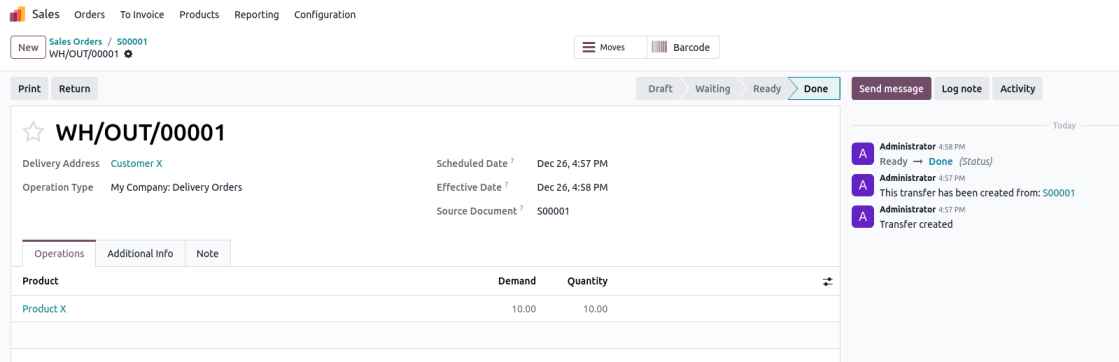
Inventory Valuation Report:
✦ Ending stock becomes zero after delivery.
Review Balance sheet :
✦ No impact until Customer Invoice is posted.
Customer Invoice Posting :
✦ Create Customer Invoice with Analytic Distribution.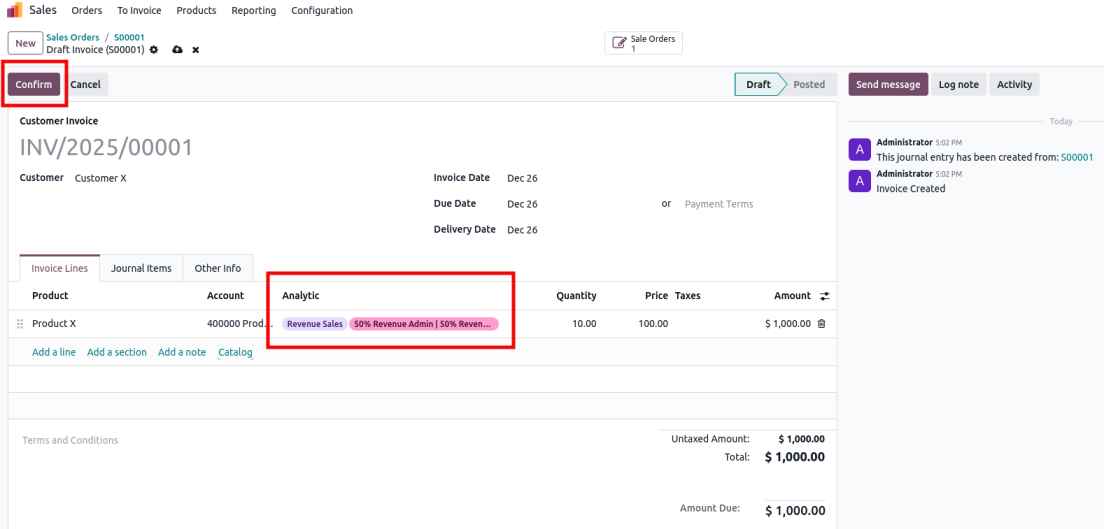
Review Journal Items:
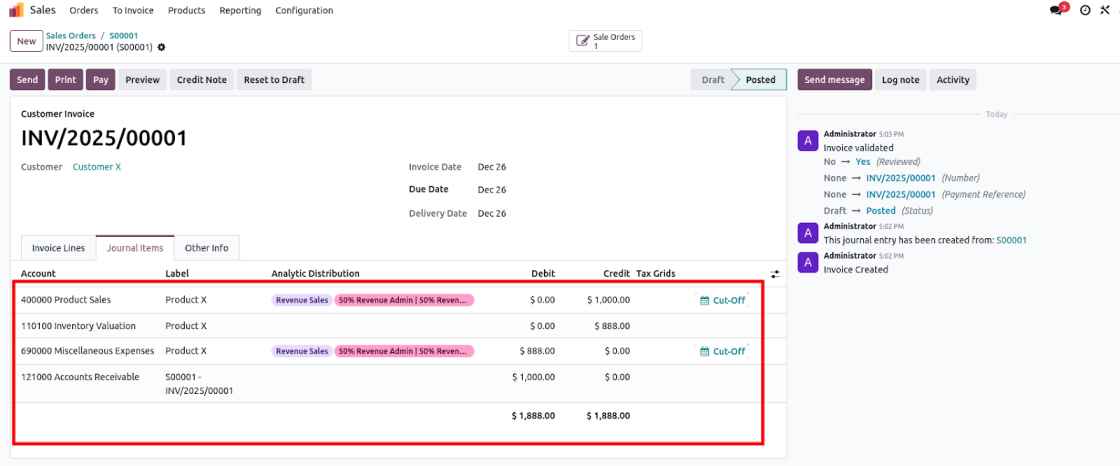
The “Miscellaneous Expenses” account is used as the Cost of Goods Sold (COGS) account.
Review Inventory Valuation Report :
✦ Inventory Valuation becomes zero.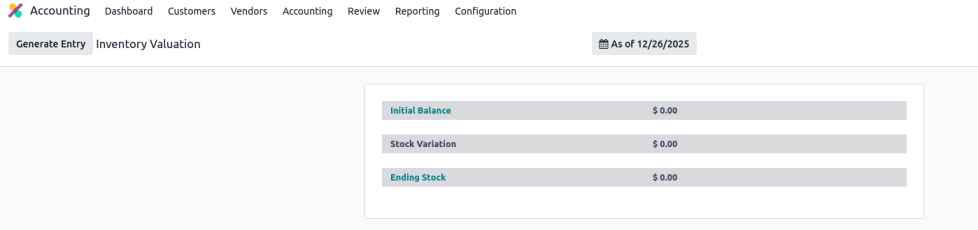
Review Balance sheet Report:
✦ COGS recognized.
✦ Revenue and Receivable recorded.
In Odoo 19 and Later Versions with Perpetual Inventory Accounting, when the vendor bill and the customer invoice are generated within the same period, no inventory closing entry is required. Inventory valuation and COGS are posted automatically, and the stock valuation/clearing account is automatically balanced to zero.
✦ Analytic entries created accordingly.
Analytic Accounting Treatment (Odoo 19 and Later Versions)
In Odoo 19 and Later Versions, under perpetual inventory valuation, analytic entries related to Sales Revenue and Cost of Goods Sold (COGS) are generated at the time a customer invoice is posted. These entries correctly reflect revenue recognition and cost allocation in the profit and loss accounts. However, analytic entries related to Inventory Valuation are generated at the time of posting the vendor bill when analytic distribution is enabled on balance sheet accounts. This practice is not aligned with standard accounting principles, as analytic accounting should be applied only to profit and loss accounts and not to balance sheet accounts.
In the current configuration, analytic costs are recorded twice:
✦ initially on the Inventory Valuation account during the purchase process, and
subsequently on the COGS account when the related sales invoice is issued.
To prevent duplicate analytic cost recognition and ensure compliance with accepted accounting practices, analytic distribution should be disabled on the Inventory Valuation account, thereby restricting analytic cost recognition exclusively to the COGS account at the time of sale.
No analytic distribution should be applied on vendor bill lines.
Periodic Inventory (Manual inventory valuation)
Let us understand:

What it is
Inventory value and COGS are not updated automatically.
They are calculated periodically (monthly / quarterly / yearly) using physical counts.
How it works in Odoo
✦Stock moves do NOT create accounting entries
✦Inventory is adjusted manually at period end
✦COGS is calculated outside or via manual journal entry
Required settings in Odoo
✦Product → Inventory Valuation = Manual
✦No stock valuation accounts required
Example accounting flow (period end)
Dr Inventory Valuation
Cr Purchases / Opening Stock
Dr COGS
Cr Inventory Valuation
Best for which businesses
✦ Service companies
✦ Small businesses
✦ Businesses with low stock value
✦ Non-stock or consumable goods
✦ Companies without strict audit requirements
BASIC CONFIGURATION – PERIODIC INVENTORY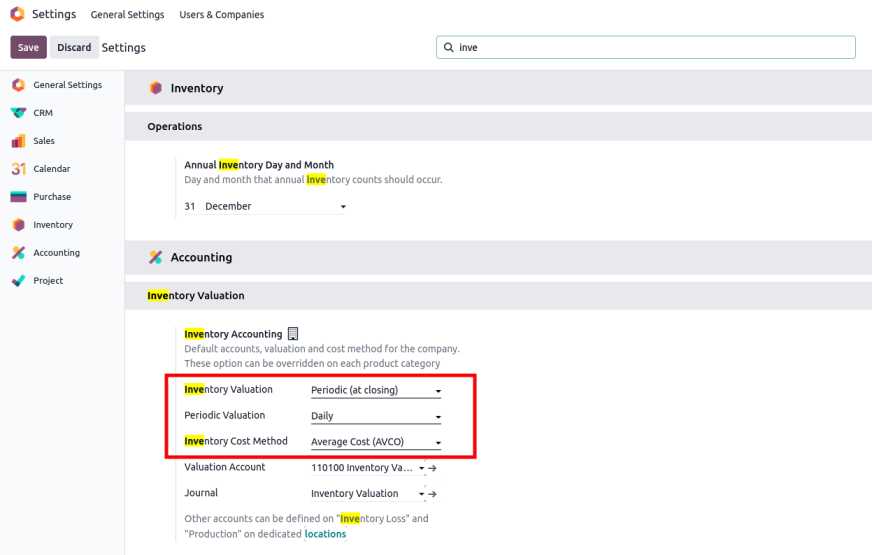
Product Category Configuration :
✦ Inventory Valuation: Manual
✦ Costing Method: Average or Standard
✦ No automated stock accounts required

Product Setup :
Create Product Z with:
✦ Manual inventory valuation
✦ Average costing method
Purchase and Receipt :
✦ Create RFQ and confirm Purchase Order.
✦ Receive stock.
Inventory Reports:
✦ Stock quantity updated.
✦ No accounting entries created.

Vendor Bill Posting
When stock is received but the vendor bill has not yet been posted, the value is tracked through a variation or clearing logic and does not impact the Profit & Loss as COGS. Upon confirmation of the vendor bill, Accounts Payable is updated to reflect the liability to the supplier, while COGS is still not recognised.

Review Inventory Valuation Report :
✦ No impact on Inventory Valuation Report.
Review Balance Sheet Report :
✦ No Balance Sheet impact at this stage.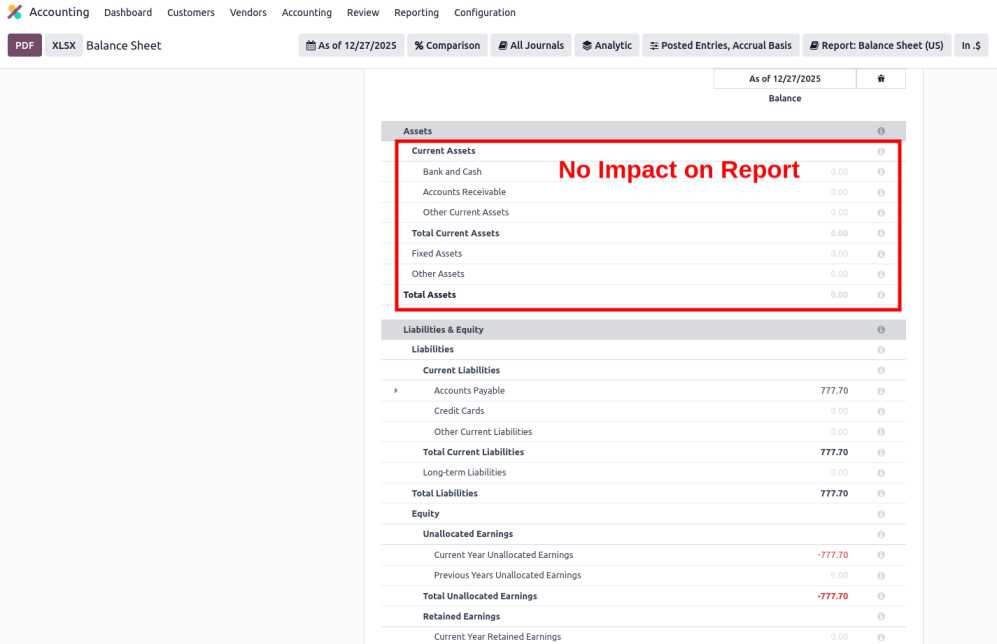
Period-End Inventory Adjustment 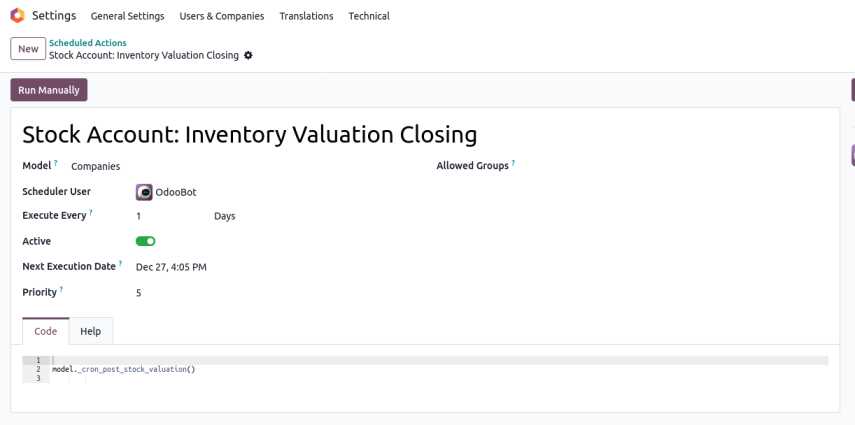
Based on closing stock (Daily / Monthly / Yearly):
✦ Automated journal entry generated.
At period closing, a manual stock valuation entry is generated to move the correct inventory value and recognise COGS. Until this closing entry is posted, the P&L remains unaffected.

Review Inventory Valuation Report:
✦ Stock Variation remains zero.

Review Balance Sheet Report updated.
✦ Inventory value updated in Balance Sheet.
Sales Flow :
✦ Create Sales Order.

✦Process and validate Delivery.

✦ Review Inventory Valuation Report
✦Review Balance Sheet
There is no impact on the Balance Sheet report at the time of sales order confirmation or delivery.
✦Create Customer Invoice and Post.

✦Review Inventory Valuation Report
No impact on Inventory valuation or Balancesheet report

✦Review Balance Sheet Report

✦Closing of stock done as per configuration settings (Daily / Monthly / Yearly)
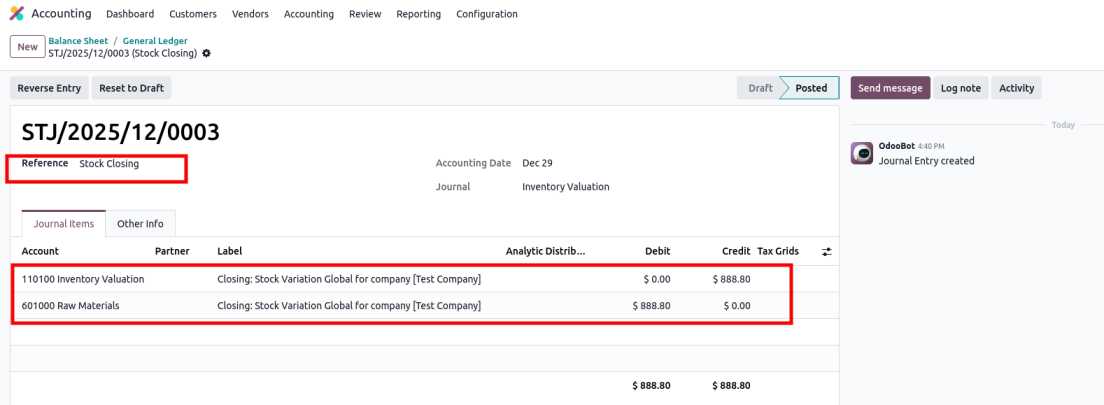
✦ Both the Balance Sheet and Inventory Valuation reports are updated accordingly.
That entry moves the value to the balance sheet as “Stock / Inventory,” and also adjusts your expense/variation accounts.
Inventory Valuation, stock variation becomes ZERO
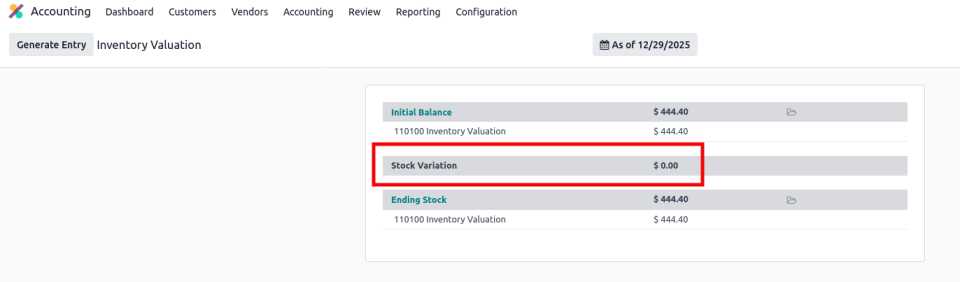
✦Balance Sheet value reduced by the sales invoice amount.

Periodic Inventory Valuation (In Short)
In periodic inventory valuation, accounting entries are not created for every stock movement. Instead, inventory and cost adjustments are made once per accounting period, typically at month-end or year-end.
Periodic valuation requires a manual period-end adjustment and is suitable for organizations that:
Prefer to minimize automatic accounting entries during day-to-day operations
Close their books on a monthly or annual basis with accountant oversight
Commonly record purchases as expenses and adjust inventory balances at period end

🌐 Website: https://probuse.com/
🧪 Demo: https://probuseappdemo.com/
✉️ Email: contact@probuse.com
Contact us on above for more details.
